
Mike Browning, Director of Product Marketing
Not everyone is comfortable handing over the keys to their cybersecurity program to agents, and one reason is that many SIEM AI capabilities are still surface-deep. They draw conclusions solely from limited, preassembled context such as alerts, cases, and preconfigured integrations.
That means the agents may be reasoning and taking action from evidence that only tells part of the story. When context is incomplete, agents can reach the wrong conclusions, generate false positives, or miss genuine threats.
Effective agentic security needs far more than a prompt and a packaged alert. It needs access to the environment around it: what data is available, which detections already exist, how those detections work, which playbooks analysts follow, whether ingest is healthy, and what is happening across the platform.
That is the direction Gravwell is taking with Logbot AI in version 5.10.
Gravwell 5.10 introduces a framework for Gravwell-authored Logbot agents that can gather context from across the platform and use it to perform multi-step security workflows.
Logbot: AI That Knows More Than Syntax
Through Gravwell’s MCP server, Logbot can gather context directly from the environment, including live telemetry, users and groups, searches, detections, knowledge bases, system state, flows, and playbooks.
What makes this possible is the platform behind Logbot. Gravwell already gives security teams a comprehensive, full-fidelity view of their environment and a powerful way to search and correlate that data. Logbot builds on those capabilities, using Gravwell’s own tools to gather the evidence and platform context required for each task rather than treating AI as a separate layer sitting on top of a limited dataset.
For detection engineers, that means AI can inspect existing detections, understand their intent, spot potential coverage gaps, suggest improvements, and help maintain the query library with relevant and meaningful queries.
For analysts, it means AI can build out a more thorough investigation, write appropriate follow-up queries, step through existing playbooks, and produce case material based on what is actually happening in the environment rather than generic assumptions.
Agents Built for Real Security Operations
Gravwell 5.10 brings a set of Gravwell-authored agents that perform predefined, multi-step workflows without requiring an analyst to direct every step. Gravwell customers are already using these new Logbot Agents for key security tasks. They include:
Deepen Investigations and Build Better Queries with the Case Agent
The Case Agent acts as an interactive investigation partner for analysts and threat hunters working directly with Gravwell data.
Because it includes the full Gravwell query language reference, the agent can help write and validate queries, run them, interpret the results, and recommend the next investigative pivot. Rather than treating each prompt as a separate question, it maintains context throughout the investigation, allowing analysts to iteratively drill deeper into the data.
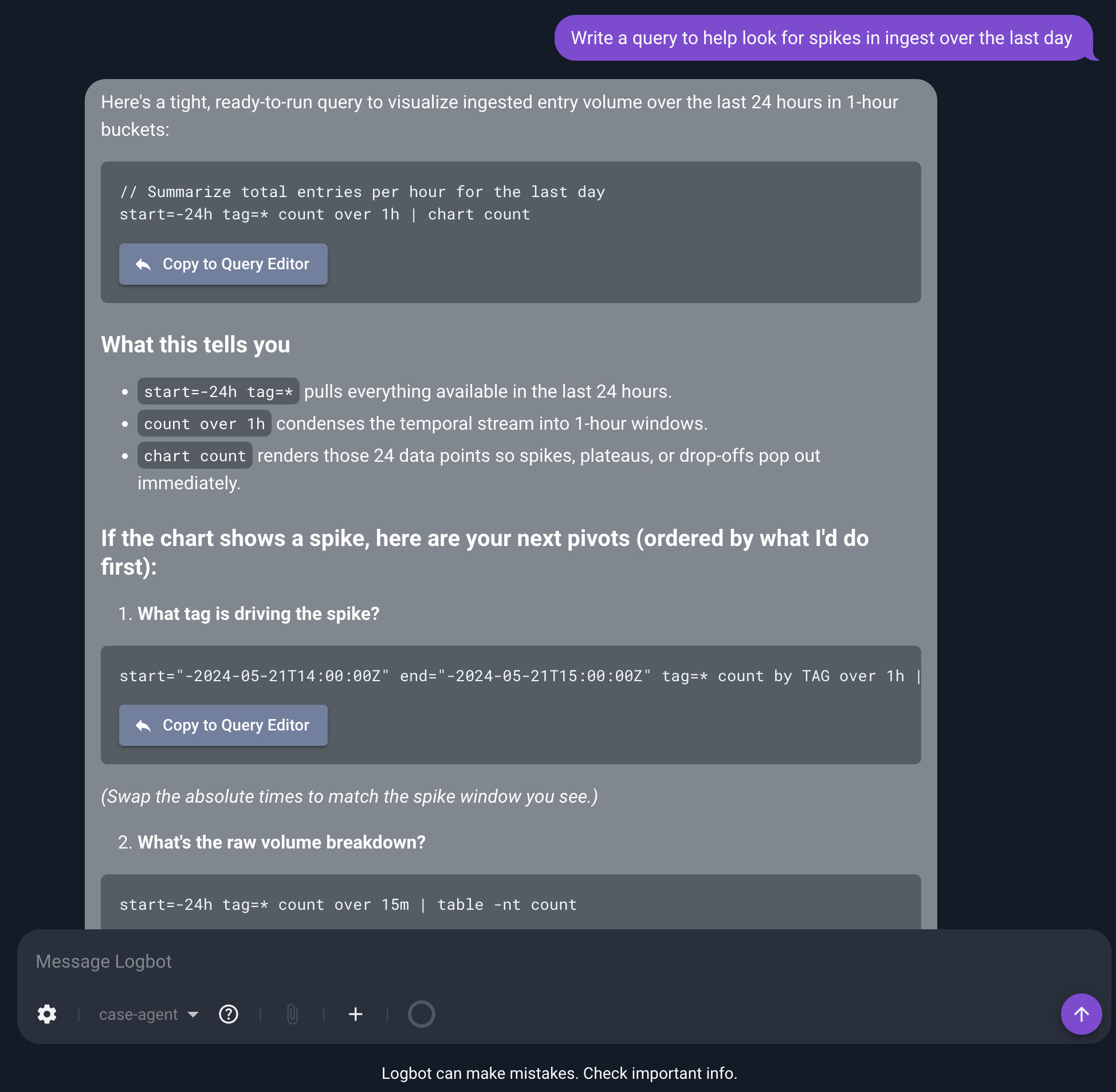
Caption: The Case Agent helps analysts move from a question to an investigation by generating ready-to-run Gravwell queries, explaining what they show, and recommending the next pivots based on the results.
For example, an analyst investigating suspicious authentication activity could ask the agent to build an initial query in the Query Studio, review what it finds, then narrow the search around a particular user or source. It can continue following the evidence without rebuilding the investigation from scratch at each step.
The agent is read-only by default and saves a query only when explicitly instructed to do so.
Reduce Alert Noise with Alert Triage Agent
The Gravwell Alert Triage Agent can operate between the detection and the analyst. When an alert is generated, the agent can review it, run supporting queries, examine surrounding activity, evaluate the evidence against its operating procedure, and prepare an initial investigation report.
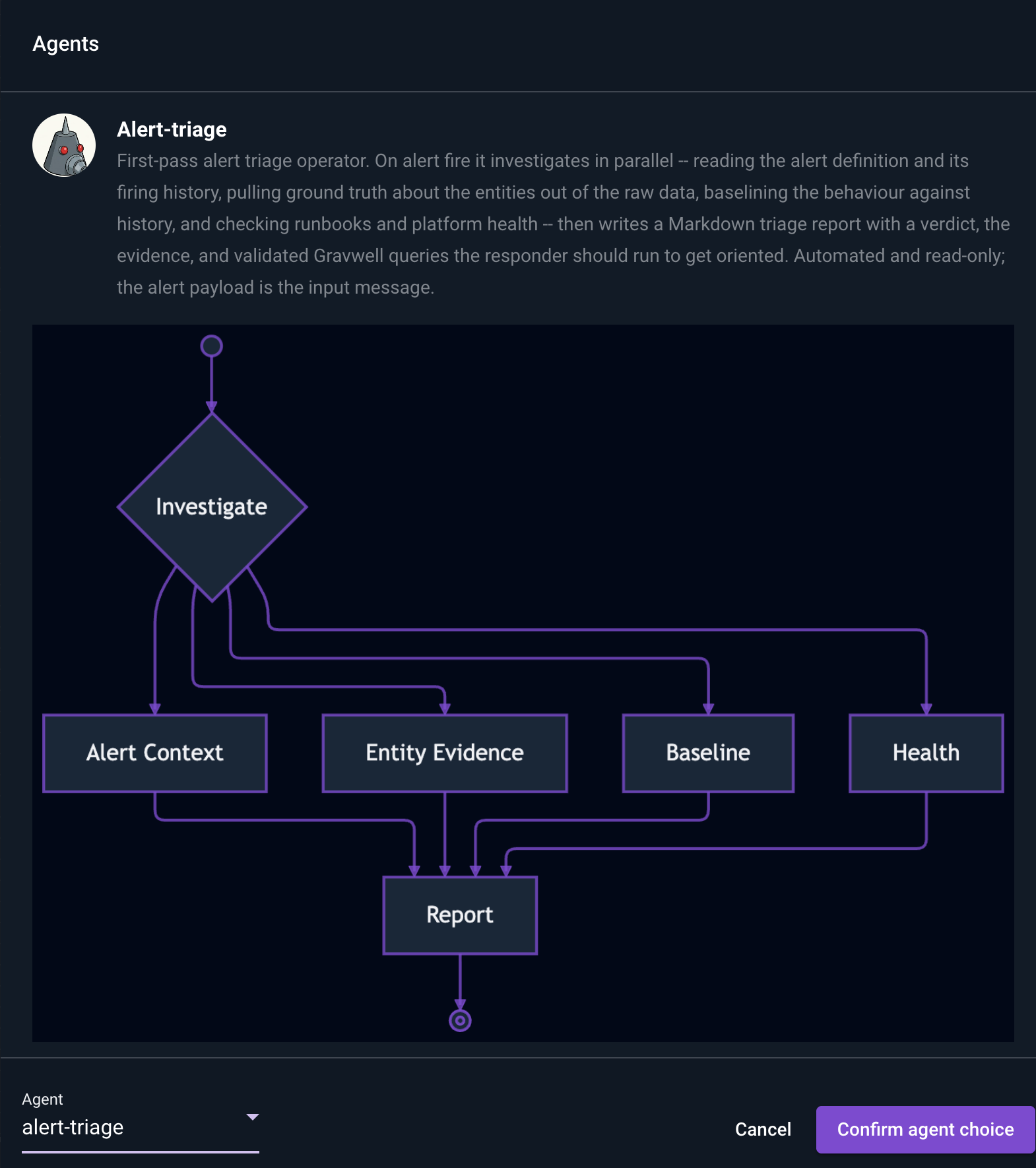
Caption: The Alert Triage Agent investigates alerts in parallel, gathering context, validating entity evidence, comparing activity against baselines, and checking platform health before producing a first-pass triage report for the analyst.
For example, when investigating a failed login, the agent can explain what happened, surface the most relevant evidence, and provide queries the analyst can use to continue the investigation. This means the analyst starts with supporting evidence and an initial investigation package rather than an isolated alert.
Understand Your Environment with the Gravwell Admin Agent
The Gravwell Admin Agent understands how the Gravwell environment is configured, allowing administrators to ask questions about their deployment and receive answers grounded in the actual environment.
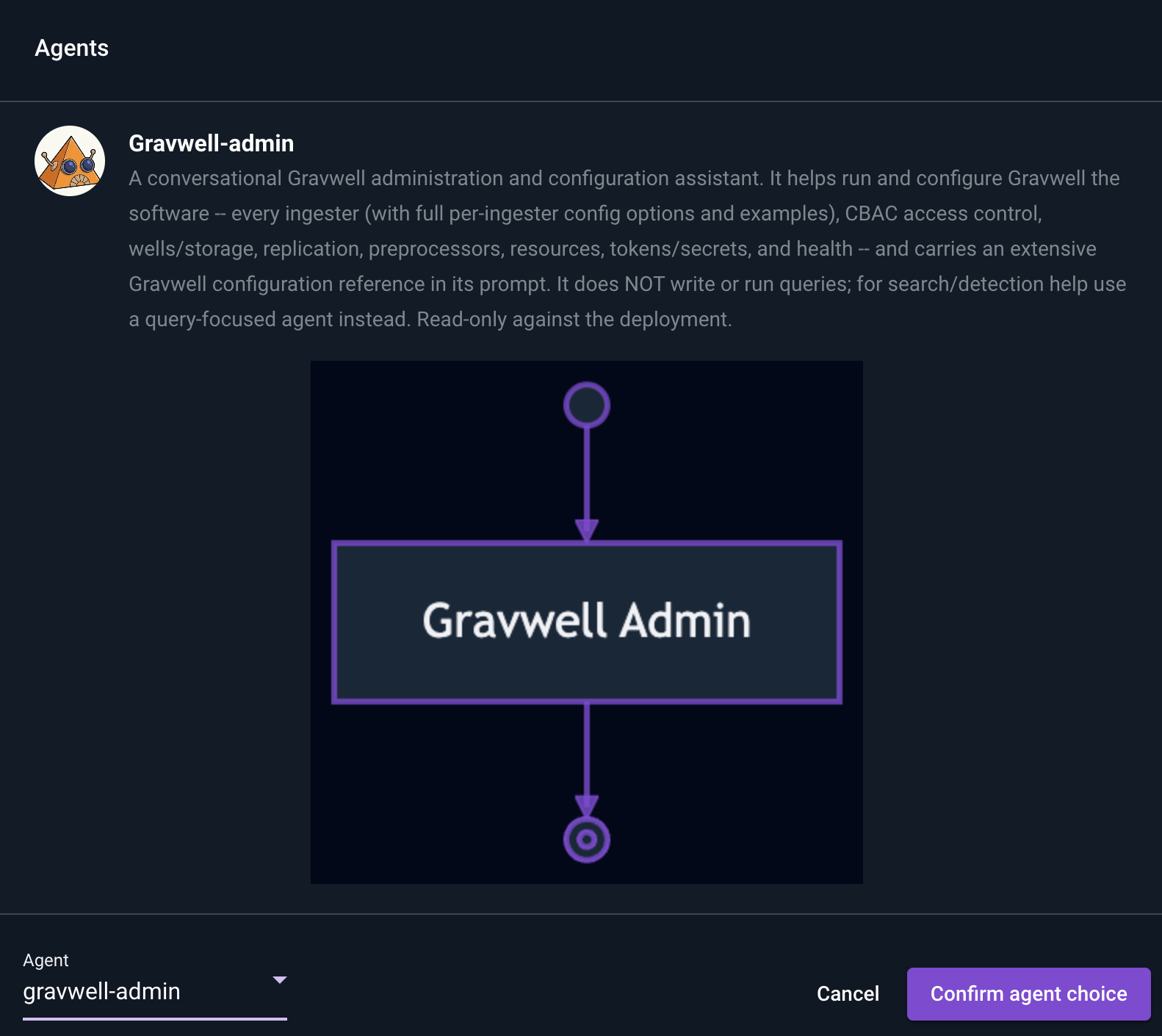
Caption: The Gravwell Admin Agent helps administrators understand and manage their Gravwell deployment by answering configuration questions across ingesters, access controls, storage, replication, preprocessors, resources, secrets, and platform health.
For example, the agent can explain how to update an HTTP ingester without requiring an administrator to manually work through configuration settings or documentation. It can also help troubleshoot issues, such as why data stopped arriving from a source, by examining the ingester configuration, data flow, preprocessors, and overall platform health.
Know What’s Important with the Daily Summary Agent
Not every useful security workflow starts with an alert.
The Daily Summary Agent answers the question, “What’s interesting today?” Each night, it reviews the previous day’s ingest for unusual patterns or activity that may deserve attention, even if no predefined alert was triggered.
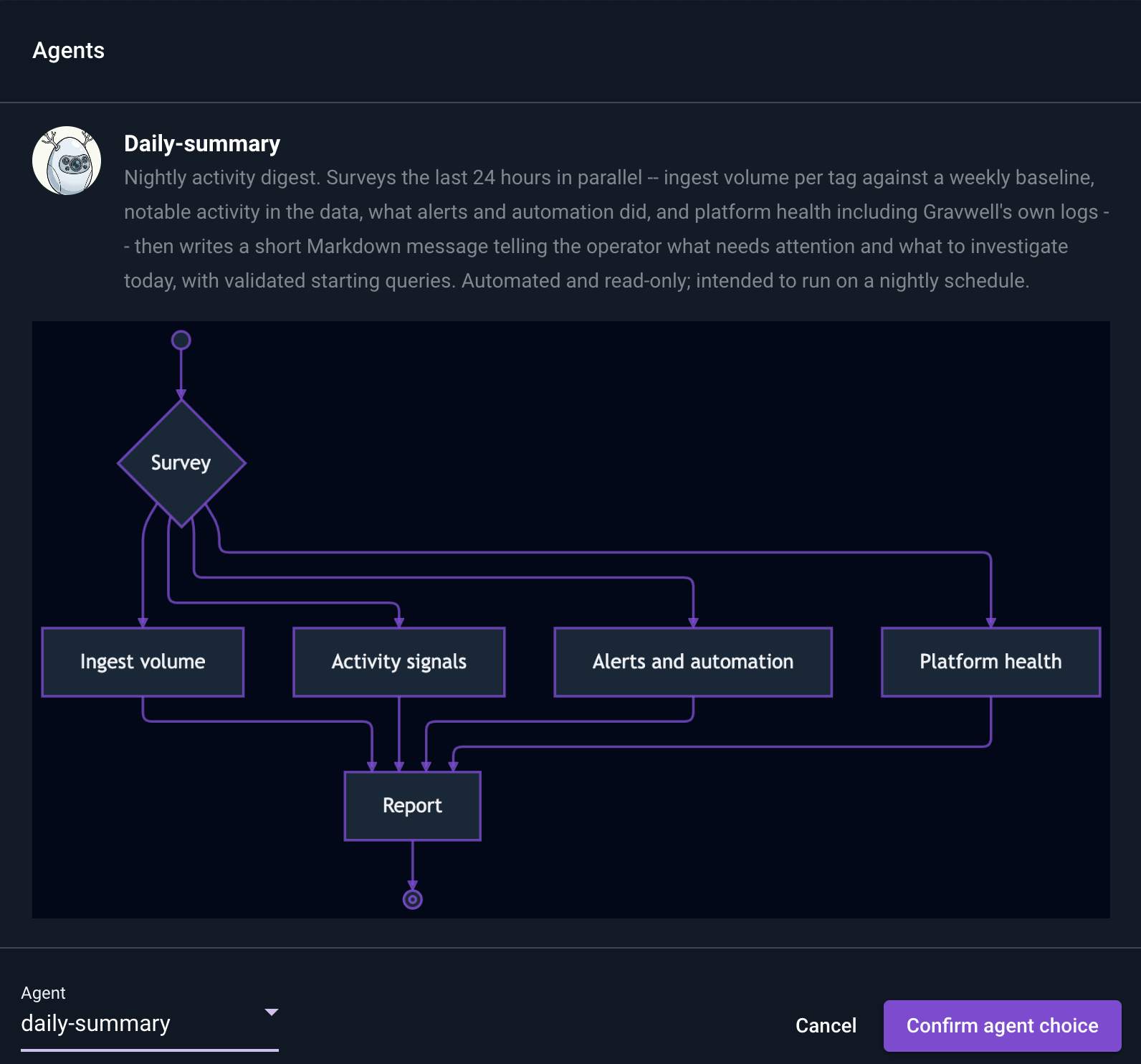
Caption: The Daily Summary Agent reviews the previous 24 hours across ingest volume, notable activity, alerts and automations, and platform health, then produces a concise report highlighting what needs attention and where analysts should investigate next.
For example, it might identify a user who normally logs in during business hours but suddenly generates a burst of authentication activity overnight, followed by an unusual increase in outbound traffic. Even if neither event triggers an alert on its own, the agent can flag the combination as worth investigating and provide queries analysts can use to explore it further.
Keep Your Gravwell Environment Healthy with the Audit Agent
The Gravwell Audit Agent gives administrators a read-only health and hygiene check across the entire deployment.
It runs multiple audits in parallel across automations, alerts, query content, infrastructure, and data flow to identify issues that can quietly degrade security operations over time. That includes scheduled searches that have stopped parsing or stalled, alerts that never fire or have no consumers, duplicate extractors, missing ingesters, dead data feeds, and storage problems.
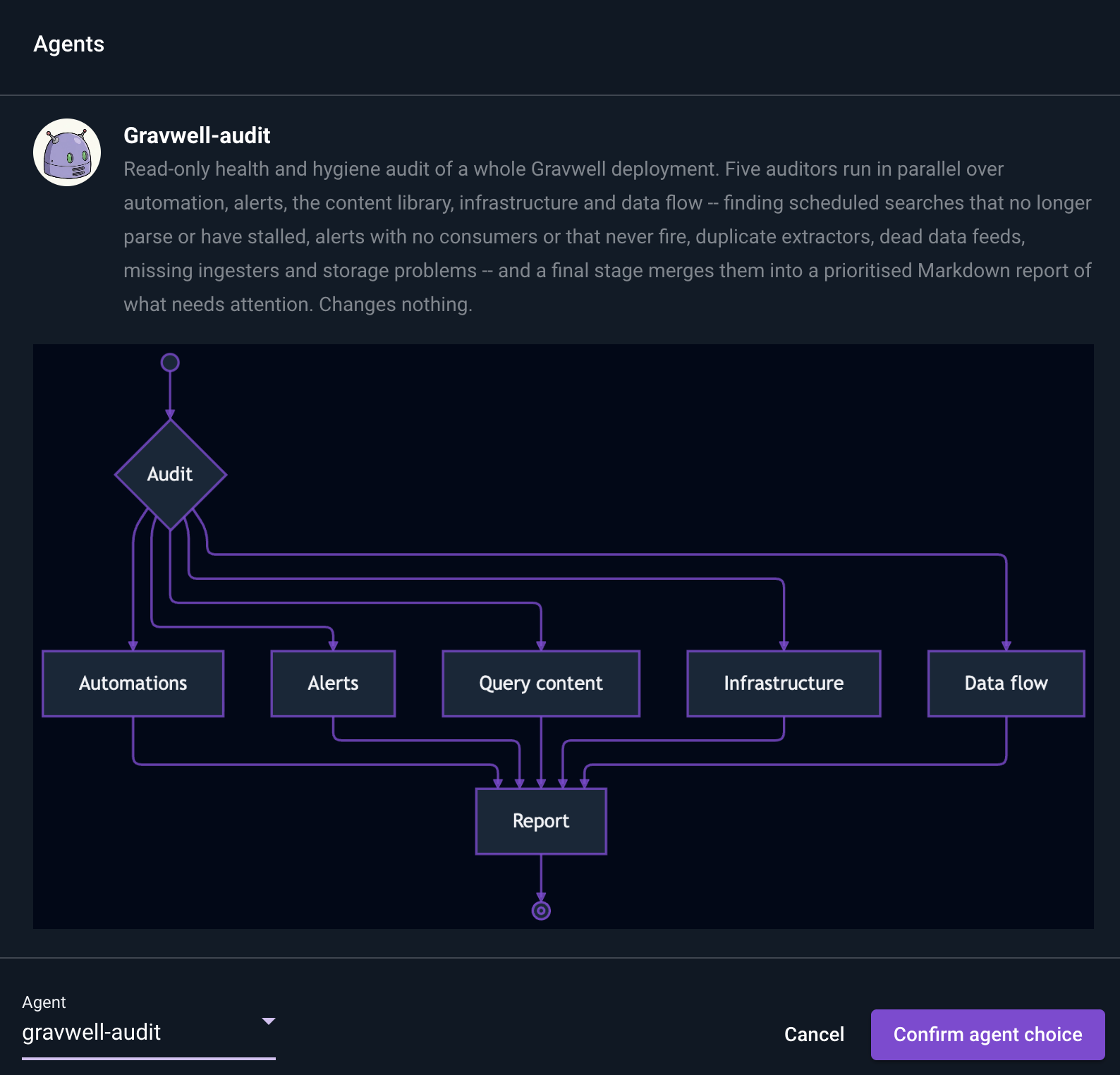
Caption: The Gravwell Audit Agent runs parallel checks across automations, alerts, query content, infrastructure, and data flow, then consolidates the findings into a prioritized report showing what needs attention.
The agent then consolidates those findings into a prioritized report that shows administrators what needs attention and where to investigate first. Because the Audit Agent is read-only, it surfaces configuration, content, and data-quality issues without making changes to the deployment.
Agents With Defined Tools, Permissions, and Boundaries
Gravwell 5.10 includes prebuilt agents through the AI Agent Preview Kit. The kit is available across Gravwell editions, including Community Edition, rather than being restricted to a separate premium AI tier. This gives teams agents with defined tools, permissions, and workflows instead of requiring them to design agent behavior from scratch.
Each agent specification defines important boundaries, including which tools the agent can access, which portion of the MCP environment it can use, which actions it may perform, and which steps it should follow. Agents receive only the tools, context, permissions, and operating procedures required for their specific jobs.
See What the Agent Is Doing
Gravwell 5.10 features an in-product visualization of agent workflows showing the individual steps an agent follows as it performs a task. Users can see how the agent gathers information, applies its instructions, interacts with available tools, and progresses toward an outcome.
That visibility is critical. If an AI is gathering evidence, prioritizing findings, or recommending a response, security teams need to understand what it looked at and how it reached its conclusions.
As agents take on more operational work, an AI analyst should ultimately be auditable in much the same way as a human analyst.
From AI Assistance to Environment-Aware Operations
Logbot already provides the conversational foundation. The promise of security agents isn't simply that they can do more work autonomously. It's that they can do that work with the evidence, tools, permissions, and operating context necessary to make their output useful and accountable. Gravwell 5.10 brings that model into the platform.
To see Gravwell’s environment-aware AI agents in action, schedule a personalized demo.